STUDIO
$199/ month
For a studio running daily classes.
- • 1 location, 3 team seats
- • Weekly notes, check-ins and promotions
- • Extra location $79/mo
- • Extra seat $15/mo
 Book a demo
Uni › For studios
FOR FITNESS STUDIOS
Members hear short voice notes from the instructor they already know: a welcome after the first class, a weekly note, a check-in when they slip. Keep the software you have.
Free to set up · 7-day free trial when you go live · Cancel anytime
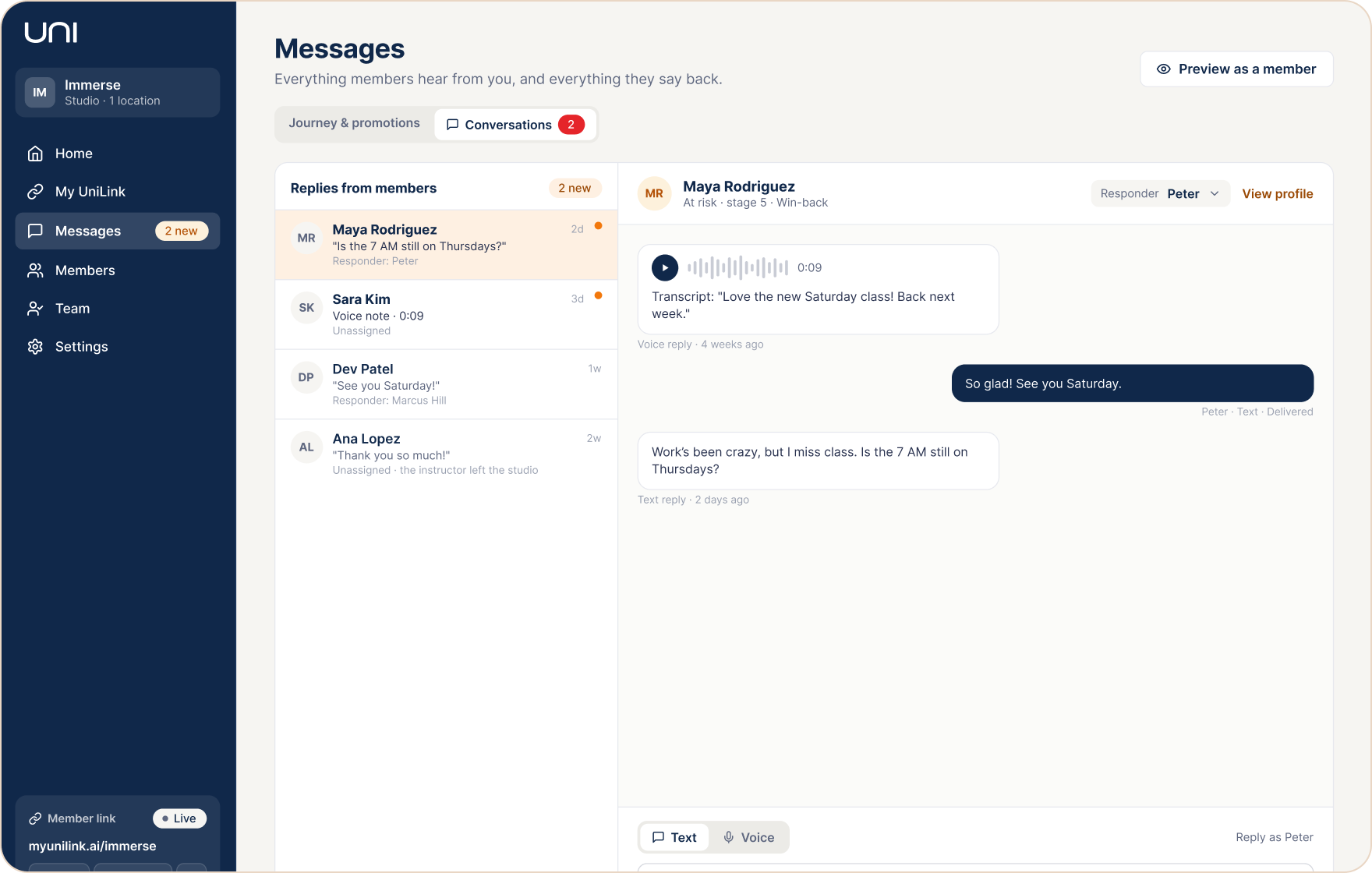
Members reply by voice or text. Every reply lands in Conversations.
WHY THE FIRST WEEKS MATTER
45%
of new members cancel within their first 90 days. Uni’s welcome and first weeks of notes are built for that window.
Source: Wodify gym data, reported by BarBend.
79%
of indoor cycling riders rate the instructor “extremely important” when choosing a class. Uni puts that instructor’s voice in every note.
Source: Stages Cycling × ukactive Research Institute, “Riding Higher” (400 riders and instructors).
WORKS ALONGSIDE YOUR SOFTWARE
Uni doesn’t replace your booking system or CRM. It adds a personal layer on top: follow-up from the instructors your members already know.
YOUR BOOKING SOFTWARE OR CRM
Runs the studio
Class schedules and bookings
Payments and memberships
Standard confirmations and reminders
UNI
Brings members back
Spots members who are new, regular or slipping
Personal voice notes in their instructor’s voice
Quick questions and replies that bridge members to their next class
A clear view of who’s coming back and who’s at risk
HOW UNI GETS YOUR DATA
Export your class schedule and member list from your current software and upload them to Uni as CSV files. Update them whenever you like. Direct integrations aren’t available yet, and nothing changes in the software you already use.
HOW IT WORKS
DAY 1
A short welcome from the instructor they just met.
WEEK 1–3
A weekly note and one quick question, so they know someone noticed.
NO VISIT IN 14 DAYS
A check-in in their instructor’s voice. You see it and approve it.
BACK IN CLASS
A note when they hit a milestone, like their 10th class.
See this running for your own members.
SEE IT IN ACTION
Maya hasn’t been to class in 16 days.
Uni flags her as at risk on your Members screen.
You approve a messagecheck-in in her instructor’s voice. It goes out as a text.
Maya listens, replies, or books her next class.
YOUR STUDIO · MEMBERS
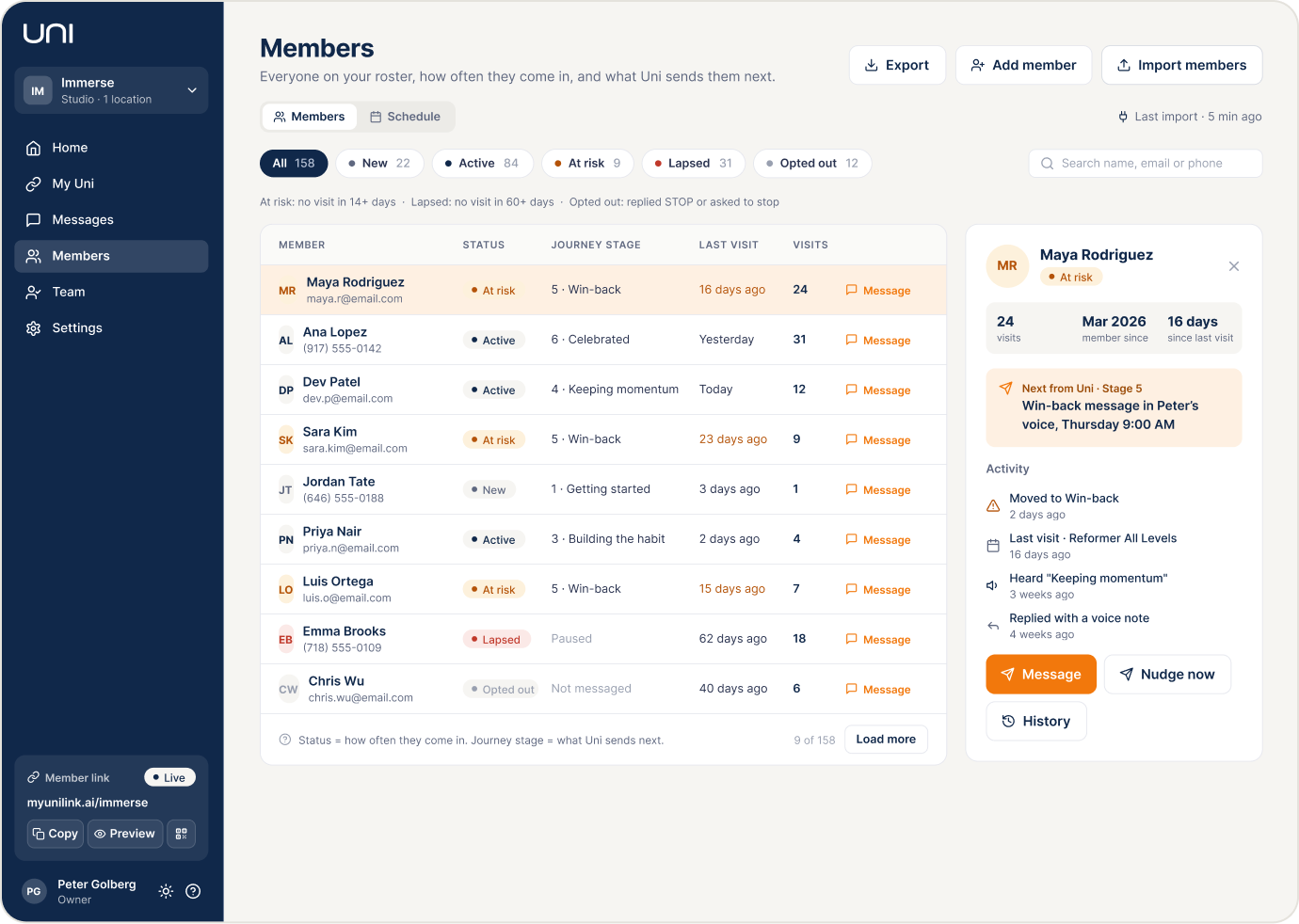
Every member’s last visit, status and journey stage, from your class list.
Members who are slipping are flagged, with a check-in ready to send in their instructor’s voice.
Voice and text replies, and answers to your quick questions, land in Messages.
YOUR MEMBERS · THEIR PHONE
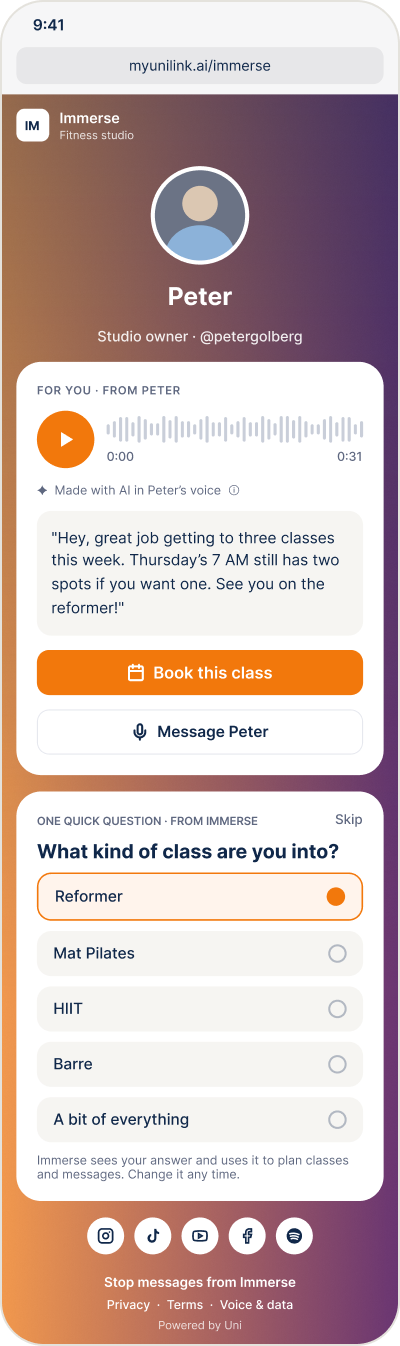
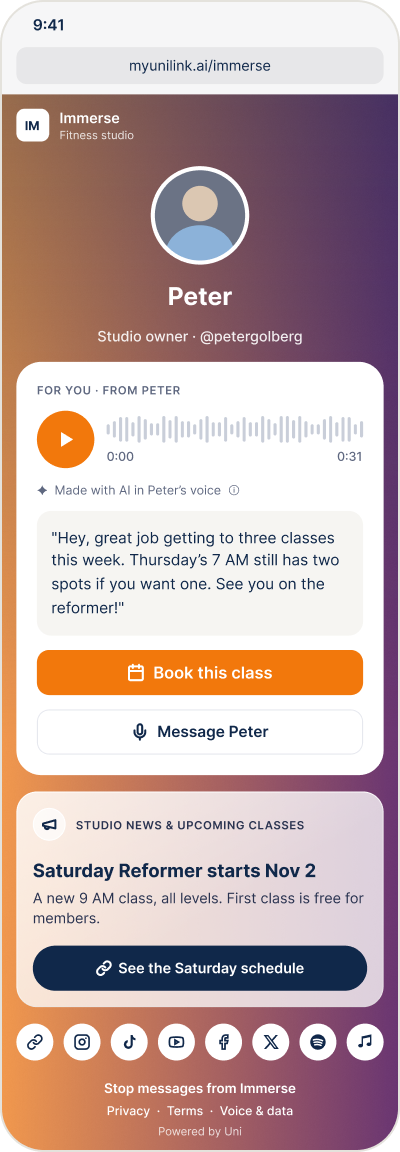
Real screens from Uni, with example data. Members open the page from a text: no app, and every AI voice is labelled.
Example studio, members and messages. These screens show how the product works, not customer results.
15-MINUTE DEMO
Bring your class list. We’ll show you who’s drifting and play a real note in your instructor’s voice. Free, no commitment.
PRICING
Free to set up. Every instructor you invite joins free. Cancel anytime.
STUDIO
For a studio running daily classes.
ILLUSTRATIVE EXAMPLE · NOT A CUSTOMER RESULT
$199
Uni for your studio, per month
1–2 memberships
kept each month that would otherwise have lapsed, at a typical $100–$200 boutique membership, would cover it
Every member after that
is revenue you’d otherwise lose
This is an example, not a promise. Your results depend on your membership prices and your members.
Prefer to start on your own? Start a 7-day free trial. It begins when you go live, not when you sign up. Instructors teaching on their own: $49.99 a month. Early-access prices in USD.
Nothing goes out until you have listened to and approved your first note.Nothing goes out until you approve your first note.
Members always see when a note was made with AI.
They opt in. STOP or unsubscribe works instantly.
QUESTIONS
Each instructor records about a minute. Uni uses it only to create that instructor’s voice notes, for the studios they’ve given permission to. They can change or withdraw that permission anytime.
You do. Nothing goes out until you’ve listened to and approved it. Instructors choose how your studio may use their voice: their classes only, studio-wide, or not at all.
Members opt in before they get messages, and replying STOP or unsubscribing works instantly. At most one message per member a day, and only between 8 AM and 9 PM in the member’s time.
Yes. Every note is labelled as made with AI, in the instructor’s voice.
About 15 minutes: upload your class schedule and member list as CSV files, invite your instructors to record their voice, and approve your first notes.
It runs alongside it. You keep using your booking software for classes, payments and memberships, and bring your schedule and members into Uni with a CSV upload. Direct integrations aren’t available yet.
The Studio plan: welcome notes, weekly notes, check-ins, quick questions and promotions for one location with three team seats. On the demo we’ll show you exactly what’s live today.
Anytime, from Settings.
Book a 15-minute demo, or set it up yourself for free. Your 7-day trial starts only when you go live.
About 15 minutes to set up · 7-day free trial · Cancel anytime